Services
Showcases
Tools
Courses
Blog Project Estimator LAB360 Schedule a Consultation
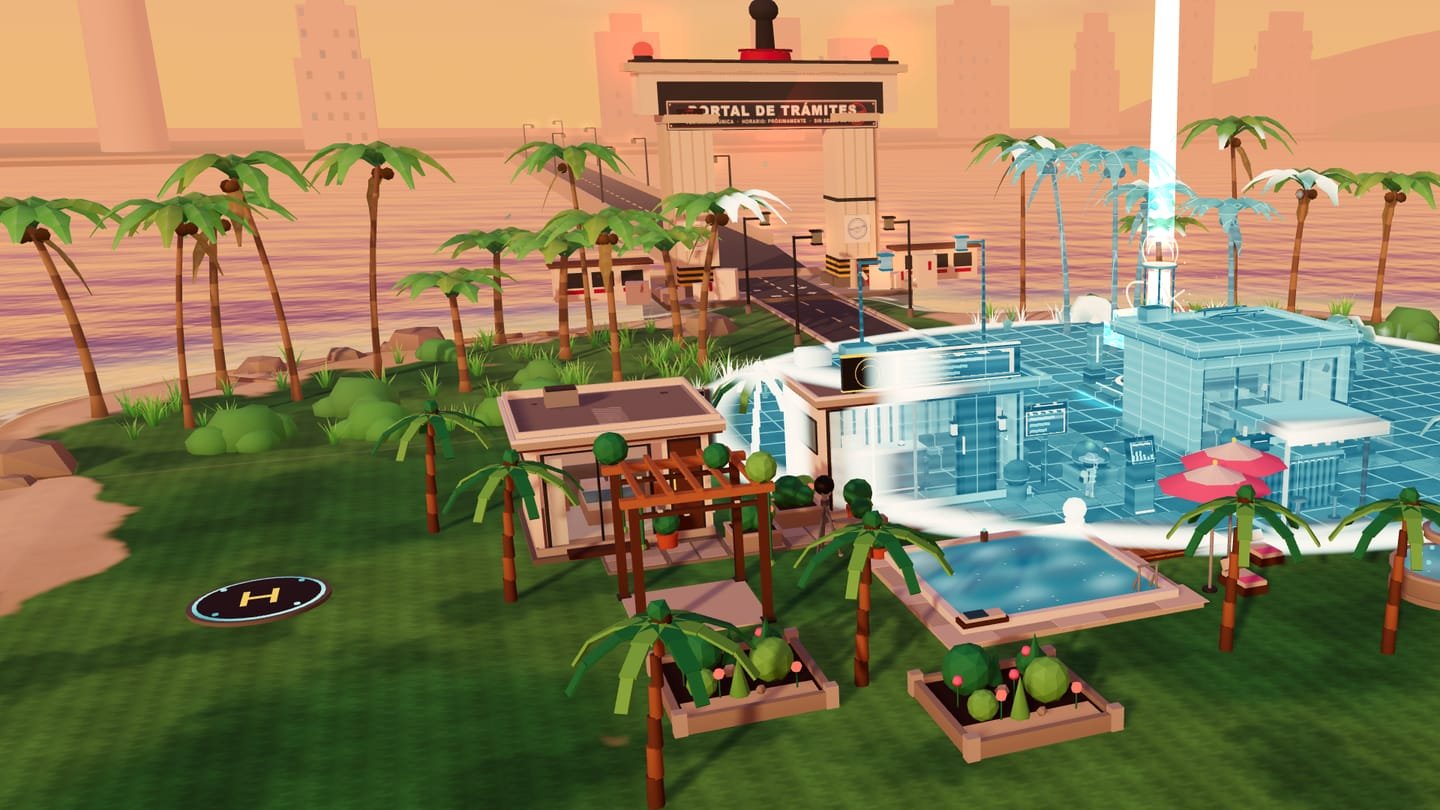
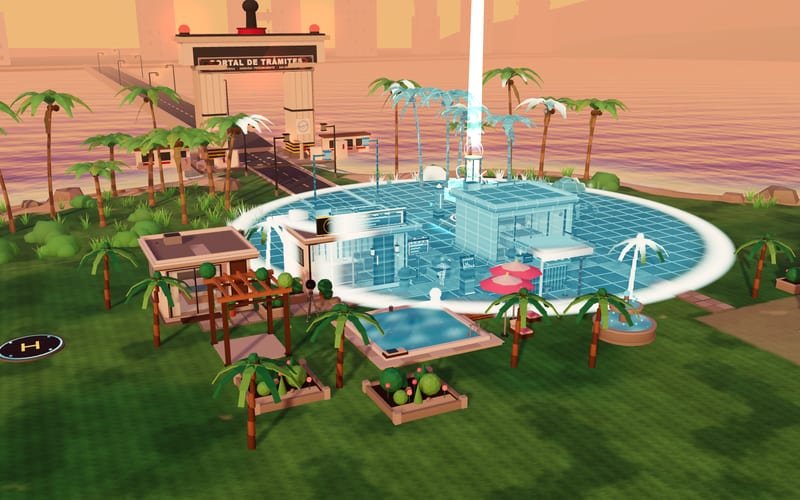
A real LUMCRAFT scene: a modular tropical villa of white stucco, glass, and wood with a pool and palm trees at sunset, the golden LUM CORE active and the blue Digital Twin layer revealing it

LUM360 Lab Experiment 007 New

LUMCRAFT — BUILD & DEFEND

Build your world. Digitize it. Defend it.

A 3D game in your browser: you raise a tropical villa piece by piece, scan it until it has a Digital Twin, attract visitors, and defend it from robots that only know how to say “a form is missing.” Free, no sign-up.

How to play The campaign

This device doesn't have the graphics acceleration (WebGL) the game needs. Try another browser or device; below you'll find how it works and what's included.

  • 6 missions
  • 35 pieces
  • 3 robots + boss
  • 25–40 min expected
  • Free · no sign-up
  1. Build35 modular pieces
  2. DigitizeScanner & Digital Twin
  3. DefendWaves and a final boss
  • Keyboard and mouse
  • Touch
  • Gamepad

What it is

An empty lot, a LUM CORE, and endless red tape.

LUMCRAFT is a modular building, exploration, and defense game set in BJ-20XX District, a fictional, satirical version of a tropical city. You arrive with a LUM CORE device and an oceanfront lot. Your mission: turn a physical space into a project people can discover, tour, and book.

A digital anomaly left businesses abandoned and the Infinite Paperwork Office, a faction of bureaucratic robots, interrupting every rebuild. They're fictional machines that stand for absurd red tape; there's no blood and no real people, just paper, sparks, ink, and leaves.

It's Experiment 007 from LUM360 Lab, and a playful way to show what we do at LUM360: a great physical space needs a great digital experience to be discovered, toured, and turned into business.

The game loop

Eight phases that feed into each other.

These aren't separate minigames: building opens up capacity and experience; digitizing raises appeal and visibility; the website and automation improve discovery and bookings; visitors leave credits; and robots damage or disable what you've built until you repair it.

  1. Build

    35 pieces in two scales: quick modules to raise a reception or a pool, and detail pieces to dress them up.

  2. Digitize

    Scan three real points of your build and power up the Digital Twin: the same villa, seen as a digital layer.

  3. Attract visitors

    Connect your website and automate inquiry → booking. Simulated visitors walk your path and book direct.

  4. Earn resources

    Credits from your visitors, LUM Energy that renews itself, and scrap that only robots drop.

  5. Prepare defenses

    LUM Barriers, an FPV turret, and a repair station, placed where the robots arrive.

  6. Defend

    Waves of robots and a three-phase boss, with the LUM Blaster, LUM Burst, and the scanner pulse.

  7. Upgrade

    Upgrade your structures and repair what's damaged: nothing disappears, it just goes out of service.

  8. Expand

    When the campaign ends, you keep building on the same map, in free build or creative mode.

How to play

Your first five minutes, no manual needed.

The game walks you through it with real objectives: each one is checked against the game state, not against a cutscene. Here's what you'll do.

  1. Activate the LUM CORE

    Move around the lot, approach the core, and press E (or the action button). From there, you can build.

  2. Break ground and build

    Q opens build mode. The ghost turns green if the piece fits and red if it doesn't, and it always tells you why.

  3. Scan and power up the twin

    Walk up to the facade, the interior, and the pool, look, and hold F. Then Tab turns on the Digital Twin.

  4. Defend what you built

    Place barriers and a turret, then press Enter to start the defense. Shoot, launch the Burst, and use the pulse to stun.

Controls

Keyboard and mouse, touch, or gamepad.

Keyboard and mouse

W A S D ↑ ← ↓ →
Move
Shift
Sprint
Space
Jump
Mouse
Look (click in the game to capture the mouse; Esc releases it)
Left click
Fire the LUM Blaster
Right-click · R
LUM Burst
Hold F
Scan; in defense, scanner pulse
E
Interact
Q
Build
Tab
Digital Twin
Enter
Start defense
G
Repair all
Esc · P
Pause
M
Mute

Building

Click · Space · Enter
Place
R
Rotate the piece
X
Delete
U
Upgrade
Z · Y
Undo · redo
[ ]
Rotate the camera
W A S D · wheel
Move the camera · zoom
Right-click · Backspace
Cancel

Phone and tablet

Left joystick
Move
Drag the scene
Look around
Big button
Fire the LUM Blaster
BURST
Area strike with a cooldown
JUMP
Jump
SCAN
Hold: scan, or pulse in defense
ACTION
Appears when you get close to something
BUILD · TWIN
Open build mode and the Digital Twin
Pinch
Zoom the camera in or out

Building

Tap the terrain
Move the ghost piece
Buttons
Confirm, rotate, cancel, undo, delete, and upgrade

No pixel-perfect precision needed: the ghost lands where you tap and you confirm with a button. You can switch the controls' hand and vibration in Settings.

Gamepad

Left stick
Move
Right stick
Look
RT
Fire
LT
Scan · pulse
A
Jump · confirm
B
Cancel
X
Interact
Y
Build
RB
LUM Burst · rotate piece
LB
Undo
Select / Back
Digital Twin
Start
Pause
Left stick click
Sprint

Works with standard controllers. It's implemented, but it hasn't been verified with real controllers yet.

The campaign

Six missions, from an empty lot to a final boss.

State objectives (having built something) must still hold when the mission ends: building, undoing, and declaring victory won't work. Cumulative ones (scans, bookings, waves) are kept. Each mission's minutes are a design estimate, not a measurement with real players.

  1. First Contact

    You arrive in BJ District with a LUM CORE

    3–4 min expected

    • Move around the lot and look around
    • Activate the LUM CORE
    • Open build mode
    • Build the Reception
  2. Build the Villa

    Rooms, a pool, and a real path

    4–6 min expected

    • Build 2 rooms and a pool
    • Add detail with 6 small pieces
    • Pave the access: from the street to the reception
  3. Capture the Space

    Scan, digitize, and create content

    5–8 min expected

    • Scan 3 points: facade, interior, and pool
    • Turn on the Digital Twin
    • Photo shoot: 2 shots
    • FPV flight: fly through the rings
  4. Be Discoverable

    Web, automation, and the first bookings

    4–6 min expected

    • Connect your website and visibility
    • Automate inquiry → booking
    • Open the restaurant (kitchen + dining room)
    • Get 2 direct bookings and 2 diners
  5. Defend Your Work

    The Infinite Paperwork Office comes knocking

    6–9 min expected

    • Place 3 LUM Barriers
    • Install an FPV turret
    • Survive 3 waves
  6. The Grand Seal

    The Grand Stamper and the final report

    4–7 min expected

    • Defeat The Grand Stamper
    • Repair all structures
    • Tour your project: 3 viewpoints
    • View your final report

Next comes the final report (Physical, Digital, Visibility, Reputation, Direct Bookings, and a strategic profile) and free build on the same map, with threats you can switch on as you like. From the menu you also get creative mode: everything unlocked, infinite credits, and no robots.

LUMCRAFT build mode: the camera raised above the lot, the grid visible, and a green ghost pool ready to be placed next to the reception
01 Build mode: a green ghost fits, a red one tells you why not

Building

Thirty-five pieces, two scales.

Quick Build to raise 2×2 to 4×4 modules (reception, rooms, pool, kitchen, dining room, bar, garden) and Detail Build to dress them with walls, windows, doors, furniture, plants, signage, and defenses. Modules need empty ground; detail pieces rest on a slab.

  • Green or red ghostwith the exact reason when a piece can't be placed.
  • Grid and 90° rotationthe piece snaps on its own; you decide which way it faces.
  • Undo and redoup to 40 actions; undoing a purchase refunds 100%.
  • Delete with a refundof 60%. And you can upgrade what you've already built.
  • Fair rulesyou can't build on yourself, the LUM CORE, the path, or water, and you can't seal off required routes.
  • Structure 12

    Reception · Standard Room · Suite · Pool · Kitchen · Dining Room · Bar · Slab · Wall · Wall with Window · Door · Pergola

  • Interior 6

    Bed · Sofa · Table with Benches · Counter · Floor Lamp · Indoor Plant

  • Landscape 7

    Palm Tree · Planter · Path · Wood Deck · Umbrella · Fountain · Garden

  • Digital 6

    Digital Sign · Booking Kiosk · Screen Wall · LUM Node · Drone Pad · 360° Camera

  • Defense 4

    LUM Barrier · Wide LUM Barrier · FPV Turret · Repair Station

In the campaign, pieces unlock as you progress (the digital sign, for example, arrives when you scan the facade). In creative mode, you have them all from the first minute.

Digitization

The same villa, now with a Digital Twin.

The LUM Scanner captures three real points of your build: the reception facade, the interior of a room, and the pool. Get close, look, and hold: the progress bar is real, it decays without penalty, and every capture unlocks something concrete. The Digital Twin transforms the same scene with a holographic wave that starts at the LUM CORE, without touching the physical state of what you built.

From the twin you open the content activities, and each one moves the indicators by readable rules:

  • Photo

    A photo shoot of your project: two shots graded Good, Great, or Excellent depending on the framing.

  • FPV

    A drone flight around your build: five rings in 75 s, no penalty for crashes, with a bronze, silver, or gold medal.

  • Website & Visibility

    Design the visitor's path: they find you → they understand → they book. It's a flow exercise, not how any search engine works.

  • Automation

    Put inquiry → reply → availability → booking → confirmation in order, and unlock the booking kiosk.

The LUMCRAFT Digital Twin switched on: the whole villa seen from above with the blue digital layer over the structures, the path, and the LUM CORE
02 Digital Twin: the wave spreads from the LUM CORE and the whole villa turns into a digital layer

The game's indicators (Physical Experience, Digital Experience, Visibility, Reputation, and Direct Bookings) are fictional: a strategic abstraction for play. They don't reproduce any search engine's algorithm or real business data.

Defense

Bureaucratic robots, without a drop of blood.

The enemies are just machines: they fall apart into paper, sparks, ink, and leaves. Each one has a clear pattern and telegraphs before it attacks, so winning is about moving, not memorizing. And if you lose, your progress isn't wiped: you respawn at the LUM CORE and damaged businesses go out of service until you repair them.

  • Phantom Form

    Small drone, in a swarm

    Fast and low on health: it throws papers. It's the one that teaches you the controls.

    “Request denied: the form to request the form is missing.”
  • Stampbot

    Ground unit, tank

    Slow. It approaches a building, telegraphs its stamp, and puts it out of service for 12 seconds. The scanner pulse stuns it.

    “Request under review... indefinitely.”
  • Fine Drone

    Aerial, ranged

    Keeps its distance, aims at you with a beam, and fires in under a second: it forces you to keep moving.

    “Estimated response time: 247 years.”
  • The Grand Stamper

    Final boss, three phases

    A telegraphed stamp slam, a core exposed for a few seconds so you can hit it harder, a rain of forms, and summons, with visible pauses between attacks.

    “Final stamp pending approval of the previous stamp.”
Defense in LUMCRAFT: Phantom Forms, a Stampbot, and a Fine Drone advance on the villa while LUM Barriers and FPV turrets block their way
03 A wave: barriers and turrets facing the robots
The Grand Stamper, LUMCRAFT's final boss, advances along the access road toward the villa, escorted by two Phantom Forms
04 The Grand Stamper, boss of mission 06
  • LUM BlasterFast, continuous fire.
  • LUM BurstAn area strike with a cooldown.
  • Scanner pulseStuns and pushes back nearby robots.
  • LUM BarrierSlows ground robots.
  • FPV TurretAutomatically fires at nearby robots.
  • Repair StationFixes nearby structures.

The lot is clear

You place the pieces. Red tape places the robots.

For everyone

Settings built so you can enjoy it your way.

LUMCRAFT can be played with a keyboard and mouse, with your fingers, or with a controller, and all six missions can be completed with touch controls alone. In-game alerts are designed not to rely on color alone, and the game pauses by itself when you switch tabs.

You change all of this in Settings, inside the game, and it's saved on your device.

  • Reduced motionAuto (follows your system), Yes, or No: fewer shakes and flashes.
  • High contrastA toggle for the interface.
  • DifficultyRelaxed, Normal, or Challenge: slower, more fragile robots, or tougher, faster ones.
  • Aim assistNone, Low, or Normal (more generous on touch).
  • Separate audioMaster volume, music, effects, and ambience, plus mute with M.
  • Controls your wayCamera sensitivity, inverted Y axis, right- or left-handed touch controls, and vibration.
  • Graphics qualityAuto (adjusts to keep things smooth), Low, Medium, or High; plus full screen.
  • Your game is yoursExport and import your progress as a .json file, or delete it whenever you like.

How it's made

Everything is generated on your device.

TypeScript and Three.js (WebGL). The world, characters, effects, music, and sounds are built with code when you open the game: no models, textures, or audio files are downloaded. The simulation (economy, building, combat) is independent of rendering and runs on a fixed step; your game is saved with IndexedDB.

Compressed engine
361 KB
Downloads only when you press PLAY NOW
Simulation
60 Hz
Fixed step, the same on any screen
Downloaded art
0 files
Geometry, textures, and audio generated by code
Graphics profiles
3 + Auto
Low, medium, and high; Auto picks for you

BJ-20XX District is fictional and satirical: it doesn't reproduce any real maps, buildings, people, or brands. The robots are machines invented for this game.

For your business

Great spaces deserve great digital experiences.

LUMCRAFT is a game, but the idea is real: a hotel, a restaurant, a clinic, or a developer needs its space to exist digitally too. At LUM360, we do it with real businesses.

  • Like the LUM Scanner

    360° virtual tours for businesses

    Let your customers see inside, trust you, and book before they arrive.

    See 360° tours
  • Like Website & Visibility

    Web development & digital experiences

    Sites that get found, get understood, and turn visits into bookings.

    See web experiences
  • Like the Digital Twin

    360° immersive experiences

    Events, brands, and tourist venues you can tour from any screen.

    See immersive experiences

Frequently asked questions

What is LUMCRAFT — BUILD & DEFEND about?

You arrive in BJ-20XX District, a fictional, satirical version of a tropical city, with a LUM CORE device. You build a villa and a restaurant with 35 pieces, scan them and power up their Digital Twin, attract simulated visitors, and defend your project from the Infinite Paperwork Office, a faction of bureaucratic robots, until you defeat the boss, The Grand Stamper.

How long is the campaign?

The campaign is six missions designed for a first playthrough of about 25 to 40 minutes. That's a design estimate: it hasn't been measured with real players yet, so your time may vary. Afterward you can keep going in free build on the same map or play creative mode.

Can I play on my phone?

Yes. There are touch controls (a joystick to move, drag to look, and action buttons), build mode works by tapping the terrain, and all six missions can be completed without a keyboard or mouse. The game adjusts graphics quality to your device, and you can set it yourself in Settings.

Is it free? Do I need to sign up?

It's free, ad-free, and requires no sign-up. Your game and settings are saved only on your device.

Where is my game saved?

In your own browser (IndexedDB), with autosave. There are no accounts and no game server. From Settings you can export your game to a .json file and import it on another device; if you clear the site's data, your progress is lost.

What happens if I lose?

Losing never wipes your progress: if your character falls, you respawn at the LUM CORE for a small credit cost; if the LUM CORE falls, you retry the same wave from a sensible checkpoint; and damaged businesses go out of service until you repair them, they don't disappear.

Is there a free build or creative mode?

Yes. When you finish the campaign you keep building freely on the same map, with threats you can switch on as you like. Creative mode, available from the menu, comes with every piece unlocked, infinite credits, and no threats.

What is it built with?

It's built with TypeScript and Three.js (WebGL). The world, characters, effects, music, and sounds are all generated on your device with code: no models, textures, or audio files are downloaded. The engine downloads only when you press PLAY NOW.

Are the game's indicators real?

No. Physical Experience, Digital Experience, Visibility, Reputation, and Direct Bookings are fictional in-game indicators, an abstraction to show how physical space and digital presence relate. They don't reproduce any search engine's algorithm or real business data.

LUMCRAFT — BUILD & DEFEND is an original LUM360 game: the world, characters, robots, music, and interface are not affiliated with any other brand or franchise.