Services
Showcases
Tools
Courses
Blog Project Estimator LAB360 Schedule a Consultation
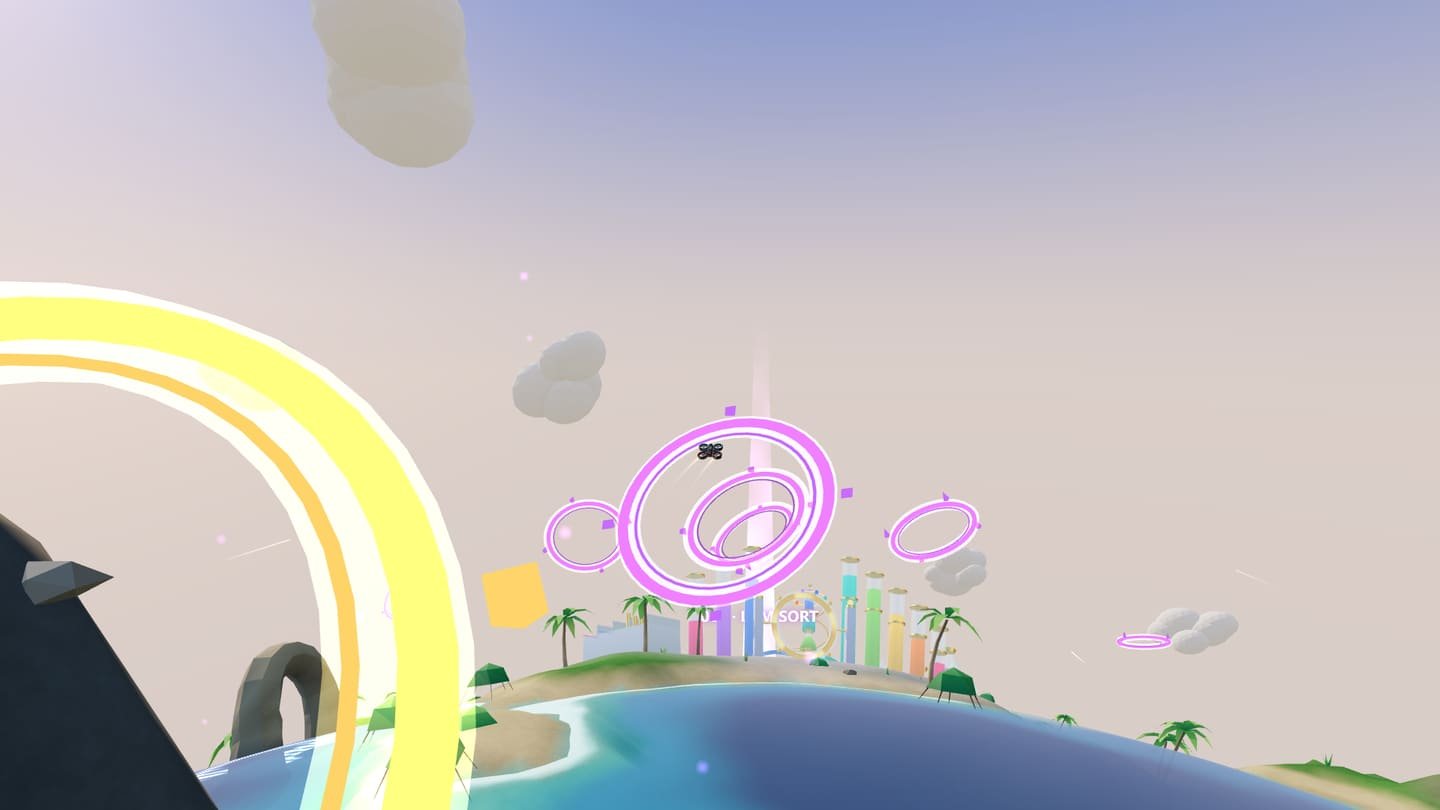
Real LUMVERSE scene: the LUM360 FPV drone flies toward a golden ring above a small tropical planet, with glowing landing platforms in the background

LUM360 Lab Experiment 008 New

LUMVERSE · THE FPV PLANET

Fly. Explore. Land.

A 3D FPV flight game that opens in your browser. Take off, fly with two joysticks through golden rings over a small planet, and land on the platforms that lead to the seven LUM360 Lab games. No signup.

How to play The seven destinations

This device doesn't have the graphics acceleration (WebGL) the game needs. Try another browser or device; below you'll find how it works and what's included.

  • 7 destinations
  • 38 rings
  • 3 circuits
  • Mode 2 · 2 joysticks
  • Phone and computer
  1. Take offFrom the LUM HOME base
  2. ExploreGolden rings and three circuits
  3. LandTo enter each game
  • Keyboard
  • Touch
  • Gamepad

What it is

A small planet, a drone, and seven games waiting.

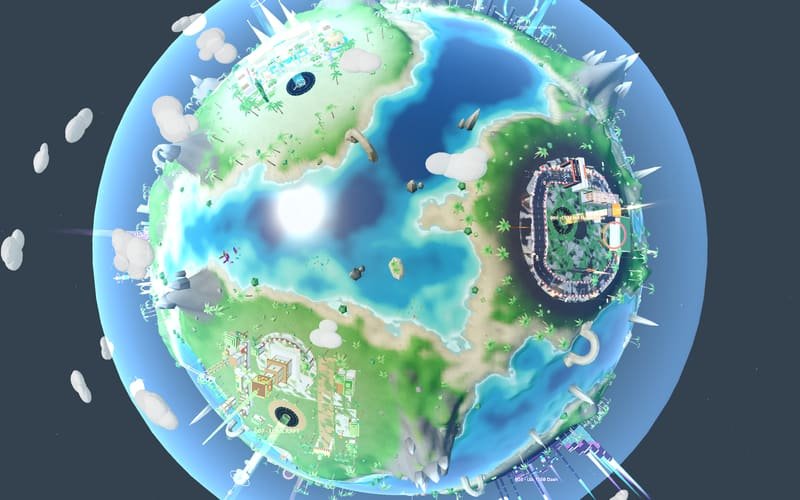
LUMVERSE is an FPV flight game set on a small planet of turquoise coasts, palm trees, and contemporary architecture. You take off from LUM HOME, the training base, and fly with the same two sticks as a radio controller (Mode 2) toward the seven destinations on the map.

Each destination is a landing platform: to enter a Lab game, you have to land on it. Along the way you'll find three circuits of golden rings, two flight modes, two cameras, and a map to set your heading.

It's Experiment 008 from LUM360 Lab and a showcase of what LUM360 can build: advanced web development, immersive experiences, 3D, interaction, and gamification, all in the browser with nothing to install.

Game details

Type
3D FPV flight game in the browser (WebGL)
Players
1
Devices
Phone, tablet, and computer; gamepad supported too
Controls
Mode 2: two joysticks (touch or gamepad) or keyboard
World
The LUM HOME base and 7 destinations
Circuits
3 · 38 rings in total
Signup
Not required · saved on your device
Language
English (US)

Fly. Explore. Land.

How to play

Take off, fly, pass through the rings, and land.

No necesitas manual: despegas directo, con indicaciones en pantalla y una asistencia de vuelo que puedes apagar. Hay un tutorial corto, totalmente opcional. Así es un vuelo típico.

  1. Take off

    Push the left stick up (throttle). The drone arms its motors and lifts off the LUM HOME platform.

  2. Fly with two sticks

    Left: throttle and yaw. Right: forward and sideways movement. Press C to switch between the chase camera and FPV.

  3. Fly through the golden rings

    Un aro cuenta solo si lo atraviesas por dentro. Elige un circuito, o vuela libre: entre los distritos hay aros de ruta luminosos que suman puntos, rachas y un impulso de velocidad.

  4. Land to enter

    Descend gently onto a destination's platform. Once the landing is confirmed, you enter its game.

The tutorial, in six stages

  1. TAKEOFFPush the left stick up.
  2. TURN · YAWTurn with the left stick.
  3. FORWARD · PITCHMove forward with the right stick.
  4. SIDEWAYS · ROLLCorrect your path to one side.
  5. FIRST RINGFly through the golden ring.
  6. LANDINGSet the drone down on the platform.
Free flight in LUMVERSE: the LUM360 FPV drone skims the planet's coast, with turquoise sea, sand, and palm trees
01 Free flight along the coast
A LUMVERSE circuit of golden rings seen from the chase camera, just before the drone flies through the next ring
02 Golden rings on a circuit
Landing in LUMVERSE: the drone descends onto a glowing platform that leads to one of the seven Lab games
03 Landing on a destination's platform

Controls

Two sticks, four axes: Mode 2.

This is the layout of the most common FPV radio controllers: the left stick handles throttle and yaw; the right, forward motion and sideways movement. With a keyboard, touch joysticks, or a gamepad, the four axes are the same.

Left stick

Up · down
Throttle: climb and descend
Left · right
Drone turn (yaw)

Right stick

Up · down
Forward: tilt forward or back (pitch)
Left · right
Sideways movement (roll)

Keyboard and mouse

W S
Move forward · backward
A D
Move side to side
↑ or Space · ↓
Climb · descend (throttle)
← → o Q E
Turn
Shift
Boost (extra thrust)

Actions

C
Camera: chase · FPV
V
Flight mode
M
Map
R
Recover the drone
T
Retry the circuit
Enter
Enter now, after landing
P · Esc
Pause

The mouse is used in menus, the map, and settings; flight is controlled with the keyboard.

Phone and tablet

Left joystick
Throttle (up and down) and yaw (to the sides)
Right joystick
Forward (up and down) and sideways (left and right)
BOOST
More thrust while you hold it
Pause · Camera
Open the pause menu and toggle chase and FPV cameras
Mode · Map
Toggle flight mode and open the map
Recover
Returns the drone to a safe spot

In Settings you can change the joystick size and side, sensitivity, response curve, and vibration. Play in landscape or portrait.

Gamepad

Left stick
Throttle (vertical) and yaw (horizontal)
Right stick
Forward (vertical) and sideways (horizontal)
RB · RT
Boost
Y
Camera: chase · FPV
X
Flight mode
Select / Back
Map
Start
Pause
D-pad up
Recover the drone
A · B
Confirm · back

Designed for gamepads with the browser's standard layout. It's implemented, but we haven't tested it with every gamepad model yet.

Flight modes

Fly assisted or by hand.

You can switch modes mid-flight (V, the MODE button, or X on the gamepad). Both use the same four axes; what changes is how much the drone helps.

To get started

STABILIZED · EXPLORER

The drone stabilizes itself: you decide where to go, and it takes care of not crashing.

Altitude
Holds it on its own when you release the throttle.
When you release the sticks
Levels out and brakes on its own.
Answer
Moderate tilt, more damped.
Landing
Assisted near the ground.

For more of a challenge

FPV PRECISION

Manual thrust and more inertia: the drone does what you ask, with no safety net.

Altitude
Not held: you control it with the throttle.
When you release the sticks
Levels out, but doesn't brake: it keeps its momentum.
Answer
More tilt and faster turns; reaches higher speeds.
Landing
No assist: you have to set it down yourself.

What's simplified compared with a real drone

  • Individual propellers and wind aren't simulated.
  • There's no acrobatic flight (Acro mode).
  • The drone is an original LUM360 design and doesn't replicate any commercial model.

LUMVERSE is a video game: it's no substitute for training or the rules for flying a real drone.

Circuits

Three circuits, 38 golden rings.

A ring only counts if you fly through the middle. When you finish, you see your rings, accuracy, time, and score, and the game saves your best scores on your device. Circuits also unlock paint jobs, trails, and lights for the drone.

  1. EXPLORER Easy

    Eight wide rings over the coast and open sea. A clear route for learning to fly.

    Rings
    8
    Length
    557 m
    Reference time
    2:30
  2. SKYLINE Intermediate

    Twelve rings at different altitudes: the LUM HUB rock arch, the great scan arch at 001, and the palm portal.

    Rings
    12
    Length
    407 m
    Reference time
    2:00
  3. GOLDEN MASTER Hard

    Eighteen narrow rings linking the planet's rock arches and the great scan arch, with tight turns at low altitude.

    Rings
    18
    Length
    773 m
    Reference time
    3:30

The reference time is a design value to help you compare your flight, not a measurement from players. You can fly a circuit in either mode.

The seven destinations

Every platform is a door to a game.

The seven LUM360 Lab games appear on the map as districts of the planet. Fly to one, land on its platform, and you're in. If you'd rather go straight there, here's the link to each game.

  1. Digitize the World

    Capture the World

    A spatial capture complex: holograms, scan lines, and floating nodes that turn a place into a digital experience.

    3D experienceGo to game Digitize the World

  2. The 360 Challenge

    Find it. Scan it. Beat the clock.

    A futuristic oceanfront villa with an observation tower, glass, portals, and objects hidden in every corner.

    360° searchGo to game The 360 Challenge

  3. Digital Resort Tycoon

    Build the experience. Grow the resort.

    A premium tropical resort in miniature: pools, lobby, villas, gardens, and small guest routes.

    3D simulationGo to game Digital Resort Tycoon

  4. LUM SORT

    Chromatic Flow

    A chromatic glass lab: sculptural bottles, glass tubes, colorful liquids, and golden lighting.

    3D puzzleGo to game LUM SORT

  5. LUM360 Dash

    Rhythm Run

    A futuristic rhythm track: musical platforms, blocks, light waves, and geometry that pulses to the beat.

    Rhythm · one buttonGo to game LUM360 Dash

  6. LUM360 HyperDrive

    Interactive WebGL Racing Experience

    A miniature racing circuit: track, curves, bridges, tunnels, grandstands, and futuristic signage.

    3D racingGo to game LUM360 HyperDrive

  7. LUMCRAFT

    BUILD & DEFEND

    A modular tropical villa built from blocks: fictional robots, defenses, a scanner, and building components.

    3D build and defendGo to game LUMCRAFT

The planet awaits

Take off from LUM HOME. Land wherever you want to play.

Accessibility and settings

Fly your way.

You can play LUMVERSE with a keyboard, with your fingers, or with a gamepad, and every menu works with any of the three. The map includes a list of the seven destinations: use SET WAYPOINT to set one as your next objective and QUICK ACCESS to enter its game without flying to the platform.

You change all of this in Settings, inside the game, and it's saved on your device.

  • Reduced motionAuto (follows your system), Yes, or No: less shake and fewer motion effects.
  • Controls your waySensitivity, response curve, inverted throttle, joystick size and side, and vibration.
  • FPV horizonAn optional aid on the FPV camera to reduce motion sickness.
  • Full or minimal interfaceShow every indicator or just the essentials.
  • Separate audioMaster volume, music, effects, ambience, and engine, plus a mute switch.
  • Graphics qualityAuto, Low, Medium, or High: Auto adapts to your device.
  • Your progress is yoursExport, import, or delete your save whenever you like.

How it's made

Everything is generated on your device.

TypeScript and Three.js (WebGL). The planet, the destinations, the drone, the effects, and the sounds are all built with code when the game opens: no models, textures, or audio files are downloaded. The page you're reading is lightweight HTML; the engine only downloads when you click “Start flight.”

Compressed engine
291 KB
Downloads only when you click “Start flight”
Downloaded art
0 files
Geometry, colors, and audio generated by code
Destinations
7 + LUM HOME
A real HTML link to each game
Graphics profiles
3 + Auto
Low, Medium, and High; Auto picks for you

The planet is fictional and doesn't depict real places. We don't measure or promise a frame rate: it depends on your device, which is why the game offers quality profiles.

For your business

A world of your own for your brand, your locations, or your catalog.

LUMVERSE is a game, but the idea is real: turning what you offer into an experience people explore, remember, and act on. It's what we do at LUM360 for businesses, events, and brands.

  • Like the planet's map

    Web development & digital experiences

    Websites that bring everything you offer together in one place and turn visits into leads.

    See web experiences
  • Like each destination

    360° immersive experiences

    Events, brands, and tourist venues you can tour from any screen.

    See immersive experiences
  • Like flying over the planet

    360° virtual tours for businesses

    Let your customers see inside, trust you, and book before they arrive.

    See 360° tours

Frequently asked questions

What is LUMVERSE · THE FPV PLANET?

It's a 3D FPV flight game you play in your browser. You pilot a drone around a small planet, fly through golden rings, and land on a platform to enter each of the seven LUM360 Lab games. It's also a showcase of what LUM360 can do: advanced web development, immersive experiences, 3D, interaction, and gamification.

How do you control the drone?

With two sticks, like a Mode 2 radio controller. The left stick controls throttle (up and down) and yaw; the right stick controls forward motion and sideways movement. On a computer, use the arrow keys (throttle and yaw) and W, A, S, D (forward and sideways); on a phone or tablet, two touch joysticks; a compatible gamepad works too.

Can I play on my phone?

Yes. There are two touch joysticks and buttons for pause, camera, flight mode, map, drone recovery, and boost. In Settings you can change the joystick size and side, and vibration. The game needs WebGL: if your browser doesn't support it, it won't open.

Do I need drone experience or a gamepad?

No. Empiezas en STABILIZED · EXPLORER, un modo asistido que mantiene la altura y frena solo, y una asistencia de vuelo que gira el dron contigo y te acerca al siguiente aro (se apaga en Ajustes). Si quieres practicar, hay un tutorial corto de seis etapas, opcional, en el menú inicial y en la pausa. Cuando quieras más reto, cambia a FPV PRECISION, con empuje manual y más inercia. No necesitas mando: se juega con teclado o con la pantalla táctil.

What's the difference between STABILIZED and FPV PRECISION?

STABILIZED · EXPLORER self-stabilizes: it holds altitude when you release the throttle, brakes on its own when you let go of the sticks, and helps you land. FPV PRECISION gives you manual thrust (it doesn't hold altitude), tilts more, has more inertia, and neither brakes nor helps you land. Neither is a real drone simulator: the game doesn't simulate every propeller, wind, or acrobatic flight (Acro mode).

How do I get into the other Lab games?

Fly to a destination's landing platform and set the drone down gently. LANDING CONFIRMED appears with a short countdown you can cancel or skip to enter right away. This page also has a direct link to each of the seven games.

Is my progress saved? Do I need to sign up?

There's no signup and no accounts. Your progress (best scores on each circuit, discovered destinations, cosmetics, and achievements) and your settings are saved on your device, in your browser's storage. If you clear your site data, they're lost.

What is it built with, and how big is it?

Con TypeScript y Three.js (WebGL). El mundo, el dron, los efectos y los sonidos se generan en tu dispositivo con código: no se descargan modelos, texturas ni archivos de audio. El motor pesa 291 KB comprimidos y solo se descarga cuando pulsas «Iniciar vuelo».

Can LUM360 build an experience like this for my business?

Yes. LUM360 builds advanced websites, 360° immersive experiences, virtual tours, and custom 3D games. If you want a world of your own for your brand, your locations, or your catalog, tell us your idea on our quote page.

LUMVERSE · THE FPV PLANET is an original LUM360 game: the planet, the drone, the interface, the music, and the sounds were created for this game and are not affiliated with any other brand, franchise, or drone manufacturer.